megacolorboy

Abdush Shakoor's Weblog

Writings, experiments & ideas.

Leave me alone, I just want to write code!

Do you think that programmers don't have to interact with people? This article will give you an insight.

The title of this post might be "clickbait" but there are some software developers who believe that they are supposed to just write code and not interact with people.

There are a lot of books that deal with sort of topic but in today's article, I will be borrowing heavily from my career experience and a favorite book of mine named Soft Skills: The Software Developer's Life Manual to talk about how important it is for a software developer to interact with people.

I'm a software developer, why should I interact with people?

Earlier, I used to be under the impression that software developers are supposed to be glued in to their screens like a Hollywood hacker and just write code. But hey, I'm sure that I'm not the only one who had been thinking in that direction.

In fact, a portion of our time is being spent on interacting with people because not only are we writing code-logic for the computer to understand but it is mainly written for humans to aid in solving their daily problems. If that's not the scenario that means we'd all be talking to computers in binary form or machine language.

As time passed by, I learnt that in order to become a better software developer, you really should know how to deal with people (but I still like being glued to my two HD monitors!).
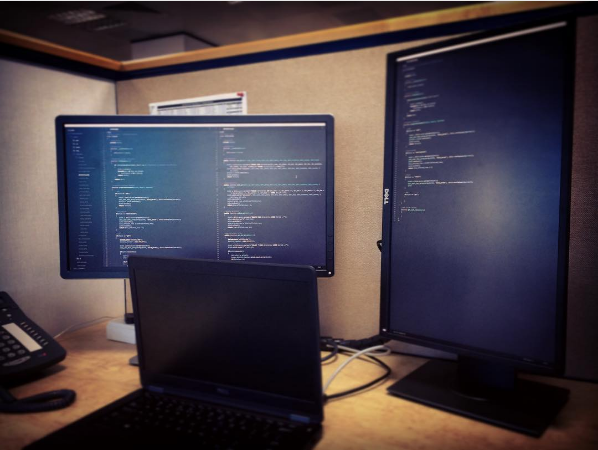
My current workspace

Think about it, where do the project requirements come from? Is it from computers? No, it's from people. Can your code send you an email to fix the new bug? No, people can.

A few examples:

  • Sitting down on weekly meetings with your boss or clients
  • Communicating with team members about the problem that you're working on and strategizing a way to solve that problem

If you still have the same mindset, you'd better rethink on that again because just like any other profession, you will have to interact with people.

How do I deal with people?

Like I had mentioned, at the very beginning of this article, there are a lot of books based on this topic but I'll try to keep it short and talk about a few points that might give you an idea on how to deal with people:

Everybody needs to feel essential

Let's face it, everyone loves to take the spotlight and would like to make everyone listen to them but there's nothing wrong about it as it's one of humanity's most desperate and deepest desires that help motivate us to achieve some of our greatest goals in our career, life and society.

Likewise, you're not the only one who has got amazing ideas, every individual does. It's very easy for you to discard one's idea, so that you can present yours instead but when you make this error, it might backfire on you i.e. you'll find others not listening to your ideas because you didn't value theirs in the first place.

So, always make it a point, if you want people to accept your ideas and think it's valuable, you'll also have to do the same thing, in return, for everyone else.

Try not to criticize

Back in my university days, when I was working on my graduation project, I used to face a lot of criticism from a fellow Computer Science Professor, who thought negativity is an effective way to motivate an individual and responded to all faults with harsh criticism but I feel that's a wrong method to motivate an individual.

If you want to inspire or motivate people to do their best, you should encourage them with positivity than harsh negativity, this could help boost their self esteem and performance as a software developer.

On the contrary, a little bit of critical feedback to help improve one's problem solving skills is totally fine.

Consider what the other person needs

During my career, I learnt that I should think about what's important to the other individual and what they want than what's important to me and what I want.

Whenever you enter in a conversation with your team member or boss, make sure you see things from their perspective. Try to understand their requirements and then when it's your turn, phrase the dialog in ways that your implementation matches their requirement.

Having shifted your mindset to this direction, you'll be making the person feel more essential and be more open to their ideas. In return, you can use leverage it in ways where people would deal with you in a favorable manner and value your ideas and skillset.

Stay away from arguments

One of the most common things that most software developers do is that they falsely believe that pure solid reasoning is enough to make another person accept your style of thinking because they assume that the latter might think about things from a logical perspective. Believe me, even I did this when talking to a lot of people.

But then, we all have this sort of nature in which we tend to pride ourselves on our own intellectual prowess but a slight difference in opinion, it hits us right in our ego and opens up a potential door for arguments.

For this reason, at all costs, it's best to avoid arguments of any sorts because talking in terms of logic and pure reasoning would do little to convince a screaming toddler. Whenever you reach a point of disagreement on how things should be done, it is best to determine whether or not that particular direction is the right way to reach the top of the hill and especially, if it involves another individual, weigh the pros and cons of a decision.

I'd like to share an interesting quote:

"I have to come to the conclusion that there is only one way under high heaven to get the best of an argument — and that is to avoid it. Avoid it as you would avoid rattlesnakes and earthquakes." - Dale Carnegie, How to Win Friends and Influence People (1936)

Probably, it wouldn't hurt much if you try to look for an opportunity to give up and admit that you're wrong on a small matter but, perhaps, it could be a big deal to the other person, which will help you build a good image and respect with them and can be leveraged in the future.

In conclusion

Being a good software developer isn't about being really skilled at coding (although, it's an imperative skillset!) but it's also about having good soft skills. If you ever thought that you have never worked on your soft skills, then this is time right for you to begin as you'll find your career much more enjoyable and accumulate a lot of skills and benefits in the future that will help you down the lane.

Hope you liked reading this article!

Au Revoir!

Building something out of nothing

What does it feel like to transform an idea into reality?

I know, it's been a while since my last article and this time, I felt that I wanted to talk about something different. For a change, I was going through some folders of my old, unused projects and I thought of improvising them and mash all of those projects into a virtual smartwatch! So, start exploring it!

I'd like to share one of my favorite quotes:

"I'm personally convinced that computer science has a lot in common with physics. Both are about how the world works at a rather fundamental level. The difference, of course, is that while in physics you're supposed to figure out how the world is made up, in computer science you create the world. Within the confines of the computer, you're the creator. You get to ultimately control everything that happens. If you're good enough, you can be God. On a small scale." — Linus Torvalds in The Beauty of Programming

Sometimes when working with huge complex systems, useless error messages, unusually long SQL queries or an abominable APIs, I forget why I enjoy computer science. Every once in a while, reading a quote like the one above, would put me back in the right direction.

I know this might sound a bit cheesy but back in my childhood days, I liked watching Dexter's Laboratory and the idea that Dexter had a secret lab and he was able to build robots and gadgets was one of those things that I found really fascinating as a child.

The reason I chose Computer Science in the first place was to be able to build my own things from scratch. Whenever I had an "itch to scratch", I would require nothing but my mind, my favorite text editor (Sublime Text), a Terminal and turn up some good classical music like Mozart or Beethoven and start building from scratch.

The ability to start with an empty page in your text editor or IDE and wind up building something that works (despite, a lot of trial and error) is so gratifying in ways that's difficult to explain to anyone who's never built it.

Virtual Smartwatch:

  • Press the Power button to ON/OFF Device.
  • Swipe left or right to switch between applications.
Uhh yeah, it's somewhat identical to Apple Watch

For those of you who know how to program, you can understand that there's nothing like having a "thrill" of being able to build anything that your mind can think of. And for those who are learning or yet to learn, it will come out but you'll just have to explore further. Maybe it's that tiny feeling of accomplishment provided that you're able to explain to other people about how the whole thing works or perhaps, maybe I'm just too immature enough to work with other people's code.

Although, sometimes, I've felt the need to spend more time working on solving "useful" problems during my free time as time passes by, building tiny projects like these allow me to refresh my knowledge. It also applies very well to projects that I did to learn something. My previous projects like Sudoku and Pong are some of the examples. Small, self-contained, visually interactive projects that I built just for fun.

Hope you guys liked reading this article!

Adios Amigo!

Arcade Challenge 4: Tetris

This is the fourth article of the Arcade Challenge series. In this article, I'll be talking about Tetris, it's history and game mechanics, in short.

Before you read more about this article, play with the above game. It's simple, control each block using WASD keys to rotate and move the block to the left, right and down of the canvas.

This is part of the Arcade Challenge series. If you haven't read the previous articles, here you go:

Background

Tetris is a tile-matching puzzle game in which you have shapes called "Tetrominoes" (I'll be talking about it more in detail below.) falling down vertically from above into a matrix or "the well". The game's objective is to set a high score by manipulating the seven shapes (but I didn't set a scoring system for this implementation) by moving left, right, down or rotating the shape by 90 degree units. As the game progresses, the tetrominoes would fall faster in every level, thus, making it challenging to play.

History

In 1984, the game was invented, designed and programmed by an AI researcher named Alexey Pajitnov, who at the time worked for the Soviet Academy of Sciences in Moscow.

Tetris cover art

Alexey Pajitnov was inspired by the classic Roman puzzle game called Pentomino. In 1985, the game was published for various game consoles.

Game mechanics

This game has quite some interesting mechanics, for those who don't know, here it is:

Generating Shapes

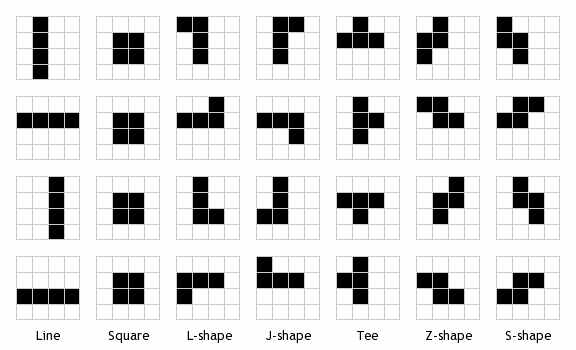
These shapes are called "tetrominoes" i.e. a unique arrangement of 4 cells in a 4x4 grid. Mathematically, it is proven that there can only be seven tetrominoes on a two-dimensional space, which also means seven different ways to arrange 4 cells.

The Seven Tetrominoes

I'm sure a lot of you know that Javascript doesn't have a special way of creating multi-dimensional arrays. So in order to draw a random shape, I had to convert a two-dimensional array index to a one-dimensional array index to fill each cell i.e. if it was a '1', it would be filled with color and if it's a '0', it would be empty.

//Generate new random shape
function newShape()
{
    current = [];

    var rand = Math.floor(Math.random() * shapes.length);
    var shape = shapes[rand];

    for(var y=0; y<4; y++)
    {
        current[y] = [];
        for(var x=0; x<4; x++)
        {
            //convert 2D index to 1D index
            var i = 4 * y + x;
            if(shape[i])
            {
                current[y][x] = rand + 1;
            }
            else
            {
                current[y][x] = 0;
            }
        }
    }

    currentX = 5;
    currentY = 0;
}

Collision

As I had mentioned in my previous post, I was inspired to use the AABB collision algorithm to prevent the tetrominoes from going away from the canvas. Well, we all know that simple physics says that if an object is dropped from above, it should break the ones below but in this case, that doesn't happen. Instead, the tetrominoes are stacked on top of each other, which unlike real gravity, that contributes to the actual gameplay.

//Check if this shape's position is valid in the board
function isValid(offsetX, offsetY, newCurrent)
{
    //if offsetX is not set, set it to 0
    offsetX = offsetX || 0;
    //if offsetY is not set, set it to 0
    offsetY = offsetY || 0;

    offsetX = currentX + offsetX;
    offsetY = currentY + offsetY;

    newCurrent = newCurrent || current;

    for(var y=0; y<4; y++)
    {
        for(var x=0; x<4; x++)
        {
            if(newCurrent[y][x])
            {
                if(typeof board[y + offsetY] == 'undefined' ||
                typeof board[y + offsetY][x + offsetX] == 'undefined' ||
                board[y + offsetY][x + offsetX] ||
                x + offsetX < 0 ||
                y + offsetY >= rows ||
                x + offsetX >= cols)
                {
                    if(offsetY == 1){lose = true;}
                    return false;
                }
            }
        }
    }
    return true;
} 

Freeze the Line

Honestly, I could have come up with a better name but the method freeze() stops the shape at it's current position (i.e. after a collision has occurred) and saves it to the 2D canvas.

function freeze()
{
    for(var y=0; y<4; y++)
    {
        for(var x=0; x<4; x++)
        {
            if(current[y][x])
            {
                board[y+currentY][x+currentX] = current[y][x];
            }
        }
    }
}

Rotating Shapes

In order to rotate a shape perpendicularly anticlockwise, you have to perform an operation that flips the indices from bottom to top of the matrix, this operation is called Matrix Transpose. Although I learnt this in my math classes, I implemented this operation in a Computer Graphics course that I took, as an elective, in my university on Spring 2016 for the first time.

//Rotate the current moving shape
function rotate(current)
{
    var newCurrent = [];
    for(var y=0; y<4; y++)
    {
        newCurrent[y] = [];
        for(var x=0; x<4; x++)
        {
            newCurrent[y][x] = current[3-x][y];
        }
    }
    return newCurrent;
}

Clearing the Line

At every update, the method named clearLines() has to scan for any complete row(s), if it's complete, the cells in those rows must be replaced with the ones above it. This gives a sort of "falling gravity" effect, when the remaining cells are replaced with the row that has been cleared.

function clearLines()
{
    //Bottom up approach
    for(var y = rows - 1; y>=0; y--)
    {
        var isComplete = true;
        for(var x=0; x < cols; x++)
        {
            //if there's any empty cell in the row
            if(board[y][x] == 0)
            {
                //Then the row isn't complete
                isComplete = false;
                break;
            }
        }

        //This code is to remove the current completed line,
        //and replace it with the line above it.
        if(isComplete)
        {
            for(var i=y; i>0; i--)
            {
                for(var j=0; j < cols; j++)
                {
                    board[i][j] = board[i-1][j];
                }
            }
            y++;
        }
    }
}

The game was built using HTML5 Canvas and Javascript, so please feel free to read the source code to understand the logic of the game.

What's next?

I know that in my first post, I had mentioned that I'll do this whole challenge for a month but then I wasn't able to do everything in a month. So, I decided that I will be trying my best to remake more arcade games in the future and keep posting them on this blog. Hope you guys liked reading these articles!

Sayonara!

References

Arcade Challenge 3: Pong

This is the third article of the Arcade Challenge series. In this article, I'll be talking about Pong, it's history and game mechanics, in short.

Before you read more about this article, play with the above game. The rules are simple, control the paddle using W and S keys.

This is part of the Arcade Challenge series. If you haven't read the previous articles, here you go:

Background

It's a 2D table tennis simulation game. The player controls a paddle that moves vertically up and down on the side of the screen and can compete against AI or a second player, who controls the second paddle on the opposite side. The aim of the game is to hit the ball back and forth and reach 11 points before the opponent (although, I didn't build a scoring system for my implementation as I felt it wasn't necessary).

History

Pong is one of the most popular and commercially successful arcade game built by Atari, Inc in 1972. It was the company's first game and was created by Allan Alcorn, who got it as a warm-up exercise from the founder of the company, Nolan Bushnell.

Game mechanics

There are two important mechanics that made it challenging to build this game:

Game AI

While I was building Pong, I thought of making it a 2 player game but later I decided to build a simple AI to make things interesting. Building the AI logic for this was simple, "When the player paddle hits the ball, the AI should try it's best to position itself by tracking the ball's destination to hit the it's center".

Code snippet of the AI object:

var ai = {
    x: null,
    y: null,
    width: 10,
    height:100,

    //Update the AI paddle position based on the ball's direction
    update: function(){
        var dest_y = ball.y - (this.height - ball.side) * 0.5;
        this.y += (dest_y - this.y) * 0.1;
        this.y = Math.max(Math.min(this.y, height-this.height), 0);
    },
    draw: function(){
        ctx.fillRect(this.x, this.y, this.width, this.height);
    }
};  

Ball Collision

In this game, the collision works a little different than Breakout's version. I came across an algorithm called Axis Aligned Bounding Box, which is one of the simpler forms of detecting a collision between a set of objects that are axis aligned that means no rotation. This algorithm also inspired me to use it in my next game, Tetris.

Code snippet of the Axis Aligned Bounding Boxes collision:

//AABB Collision function
var AABBCollision = function(px, py, pw, ph, bx, by, bw, bh)
{
    return px < bx+bw && py < by+bh && bx < px+pw && by < py+ph;
}

//if the ball has -ve velocity, it's hit by AI paddle and it's the player's turn
//if the ball has +ve velocity, it's hit by player paddle and it's the AI's turn
var paddle = this.velocity.x < 0 ? player : ai;

if(AABBCollision(paddle.x, paddle.y, paddle.width, paddle.height, this.x, this.y, this.side, this.side))
{
    this.x = (paddle == player ? player.x+player.width : ai.x - this.side);
    var n = (this.y+this.side - paddle.y)/(paddle.height+this.side);
    var phi = 0.25 * pi * (2 * n - 1);
    var dir = (paddle == player ? 1 : -1);

    var impact = Math.abs(phi) > 0.2 * pi ? 1.5 : 1;

    this.velocity.x = impact * dir * this.speed * Math.cos(phi);
    this.velocity.y = impact * this.speed * Math.sin(phi);
}

The game was built using HTML5 Canvas and Javascript, so please feel free to read the source code to understand the logic of the game.

What's next?

Building this game was fun as I built a simple AI and implemented a better collision detection algorithm. In my first post of this series, I had mentioned that I was working on Tetris and honestly, I finished building that game today as I didn't find the time to work on it. Now that it's ready, hence, my next post will be about Tetris.

Stay Tuned!

References

Arcade Challenge 2: Breakout

This is the second post of this month's personal challenge. I'll be talking about Breakout, it's history and game mechanics, in short.

Before you read more about this article, play with the above game. You can control the paddle using the mouse or left-right arrow keys. Press P to pause the game. Press S to resume and R to restart the game.

This is part of the Arcade Challenge series. In the previous post, I built a snake game, click here if you've not read the article.

Background

Breakout is a single player game where you have to break a layer of bricks with a ball that travels across the screen (in this case, it's a canvas) that bounces off the walls of the screen. When the ball hits a brick, the ball bounces back and of course, the brick gets destroyed or disappears. If the ball touches the bottom of the screen, the game is over. In order to prevent this from happening, the player is given a movable paddle to bounce the ball upwards, which ensures the game continues.

History

Breakout was one of the most popular arcade games developed by Atari, Inc. Inspired by the 1972's Pong, the game was developed and designed by Nolan Bushnell, Steve Wozniak, Steve Bristow using the hardware built for Pong against it's competitors who built clones of Pong.

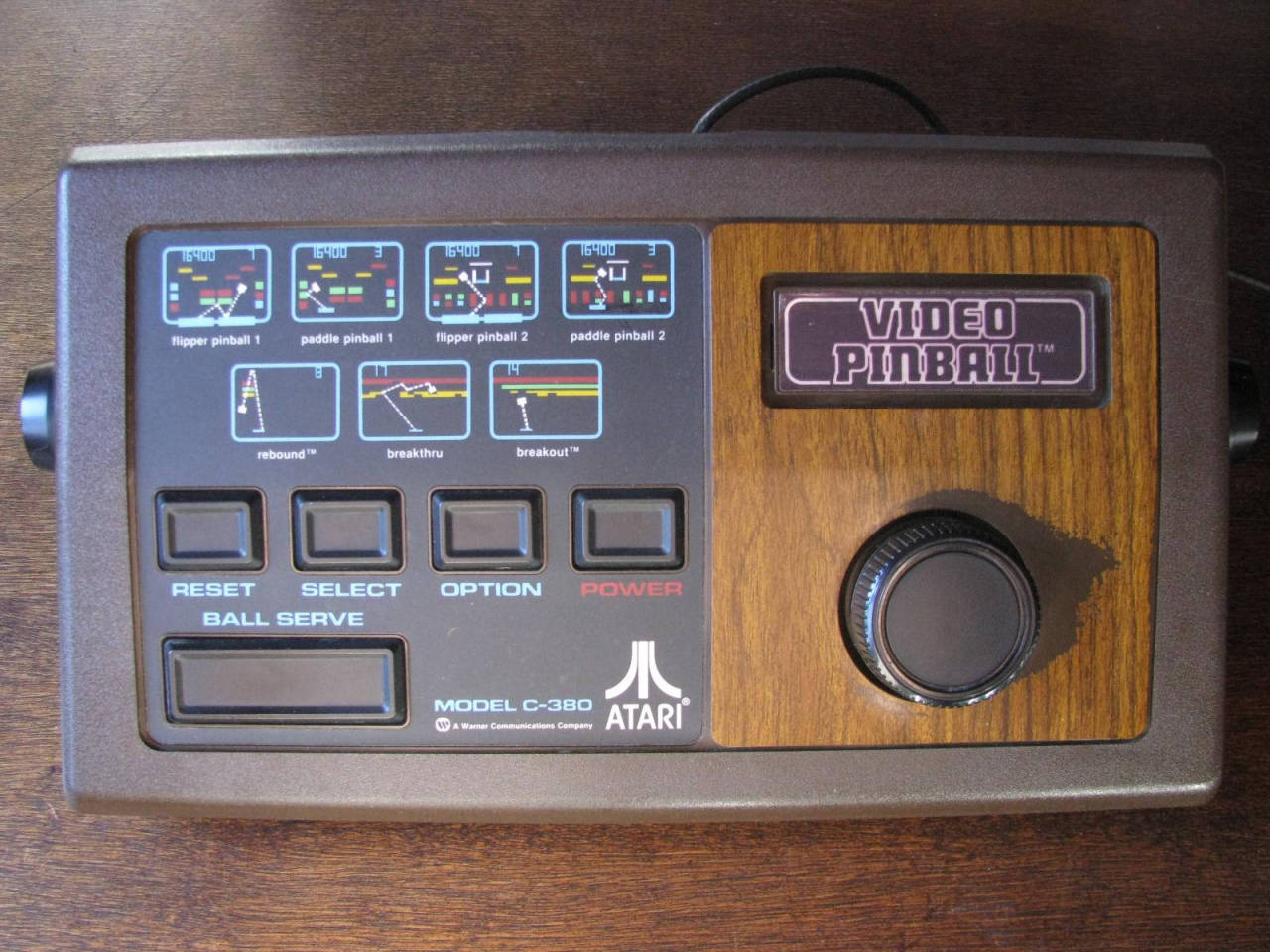
Atari's Video Pinball console system

Most notably, the late Steve Jobs was also involved with the development of Breakout as he was approached by Nolan Bushnell to design a prototype that required 150 to 170 computer chips. Jobs brought in Wozniak to work with along with him on building the prototype, who built a version of Pong using 30 computer chips and they both had spent days and nights working on it and finally built the prototype that had 44 computer chips.

However, Wozniak's design wasn't approved by Atari, Inc as they found the design to be complicated and infeasible to manufacture, so they ended up making their own version of the hardware which contained around 100 computer chips.

Game mechanics

Unlike the previous post, the game mechanics of this game are quite simple to understand and it makes use of 2D Mathematics.

Using 2D Mathematics, I was able to program the ball-brick collision, movement and bounciness of the ball and the movement of the paddle (which can only move on the x-axis).

Collision Detection

To check for ball collision, the program must check if the ball has touched / collided with the wall, if so, then the ball's direction will be changed accordingly. The ball can only bounce off from the top, left and right side of the walls and the paddle, if it touches the bottom of the canvas, it's game over.

Ball Movement and Collision Detection:

If the distance between the ball radius and the wall's edge is the same, it will change the ball direction. This would allow a proper ball collision to bounce off the walls.

Code for Ball Movement and Collision Detection:

$(document).ready(function(){
    //Canvas stuff
    var canvas = document.getElementById("ball_collision_canvas");
    var height = canvas.height;
    var width = canvas.width;
    var ctx = canvas.getContext("2d");

    //coordinates of the ball
    var x = canvas.width / 2;
    var y = canvas.height - 30;
    var dir_x = 2;
    var dir_y = 4;
    var ball_r = 10;

    //Draw a circle
    function circle(x,y,r)
    {
        ctx.fillStyle = "#FF6D6D";
        ctx.beginPath();
        ctx.arc(x,y,r,0,Math.PI*2, true);
        ctx.closePath();
        ctx.fill();
    }

    //Draw canvas
    function draw()
    {
        ctx.clearRect(0, 0, width, height);
        circle(x,y,ball_r);

        /*
            If the distance between the ball radius and the wall's edge is the same,
            it will change the ball direction. This would allow a proper ball collision
            to bounce off the walls.
        */
        if(x + dir_x > width - ball_r || x + dir_x < ball_r)
        {
            dir_x = -dir_x;
        }

        if(y + dir_y > height - ball_r || y + dir_y < ball_r)
        {
            dir_y = -dir_y;
        }

        x += dir_x;
        y += dir_y;
    }

    setInterval(draw, 10);
});

The game was built using HTML5 Canvas and Javascript, so please feel free to read the source code to understand the logic of the game.

What's next?

In my next post, I'll be talking about the third game that I built in this challenge, Pong. Well, that's it for today, hope you guys have found this post interesting and yes, have fun playing the game!

Peace Out!

References

Arcade Challenge 1: Snake Game

This is the first post of this month's personal challenge. I'll be talking about Snake Game, it's history and game mechanics, in short.

Before you read more about this article, play with the above game. You can control the snake using WASD or the ← ↑ ↓ → keys. Orange block is for food, it'll increase your score. Yellow block is for poison, if eaten, it'll reduce your score. Press Space to pause the game. Press P to resume and R to restart the game. Oh and avoid hitting the white walls!

Background

Snake is a game of simple concept where the player manuevers the snake in all 4 straight directions (reverse movement is not possible i.e. UP, DOWN, LEFT, RIGHT only) to eat the fruit and as a result, the length of the snake increases, making the game difficult for the player. The player will have to prevent the snake to hit the walls or from eating the poison, which will decrease the snake's length, and also prevent it from hitting itself.

History

I remember playing this game, for the first time, on my father's monochrome Nokia 3310 mobile phone (which can still break walls, I guess!) and every 90's kid I knew played this game a lot.

Nokia 3310 (in case, if you've never heard about it!)

The game was published by Nokia and it was programmed by a Nokia Design Engineer named Taneli Armanto in 1997 for Nokia 6110. The original concept of this game was derived from an arcade game called Blockade, which was published in 1976 by Gremlin Industries. Ever since, there have been so many variations and clones of this game, in fact, there are over 300+ variations of this game for iOS devices alone.

Game mechanics

The game makes use of Linked Lists, which is a simple and dynamic data structure used to store and control the movement of the snake. Below is the pseudocode for each of the game's behaviour:

Movement of the Snake:

for node in the list (always starts from the end of the list):
    if node is not equal to head node:
        shift the snake's position to node+1 (by making it closer to the snake)
    set head node to new position
endfor

Length of the Snake:

nx: current x coordinate of the snake head
ny: current y coordinate of the snake head

fx: x coordinate of the food
fy: y coordinate of the food

px: x coordinate of the poison
py: y coordinate of the poison

if [nx] matches with [fx] and if [ny] matches with [fy]:
    push the new cell to the snake's tail node
    shift the new cell from tail node to the head node
    increment score + 1

if [nx] matches with [px] and if [ny] matches with [py]:
    pop the cell from the tail node
    shift cell from tail node to head node
    decrement life - 1

Collision of the Snake:

nx: current x coordinate of the snake head
ny: current y coordinate of the snake head

sx: x coordinate of the snake cell
sy: y coordinate of the snake cell

wx: x coordinate of the wall cell
wy: y coordinate of the wall cell

for cell in the wall array:
    if [nx] matches with [wx] and if [ny] matches with [wy]:
        display "game over" message

for cell in the snake list:
    if [nx] matches with [sx] and if [ny] matches with [sy]:
        display "game over" message

Oh yeah, please feel free to study the source code of this game in order to understand how this game was implemented on Javascript.

What's next?

In my next post, I'll be talking about, the second game that I built in this challenge, Breakout. I hope you've found this article interactive and interesting and yes, have fun playing this game!

Adios Amigo!

References

I challenged myself to build 4 arcade games!

I challenged myself to build four arcade games during this month. Hope you'll enjoy reading this article.

Alas! It has been a long time since my last blog post.

Last month was the Holy Month of Ramadan, so I kept myself busy with my religious duties and it also kind of ruined my sleeping pattern, thus I was tired to post anything. Since I was pretty exhausted after that, I decided to take a week off from work to spend some time with my family and also thought of working on my side projects and then I realized that I need to set a personal challenge to get myself motivated for the month.

What's the challenge?

When I was building this blog, I had the intention of remaking arcade games and posting them over here for the visitors to come and play them! So since I had a week off from work, I challenged myself to build four arcade games this month and create a separate blog post for each game, where I would be talking about how it was built, it's history and it's game mechanics.

These are the list of games that I had planned to build/already built during this month:

  • Snake
  • Breakout
  • Pong
  • Tetris

How did the challenge feel?

Honestly, it was really refreshing and felt like a mini-hackathon. I was able to learn new things about Game Programming and 2D Mathematics and as a result, I have upgraded my knowledge on Javascript as well. Although I told myself that I would build all of these games in a month, during my time off, I was able to build everything except Tetris as I'm still working on it.

What's next?

I know this is a short post but I'm working on the content for each blog post, so that it doesn't feel rushed! Once I have posted all of them, I'd like to know your views on each of them and it would be also nice if you could suggest any arcade games that I could remake!

Until next time, then!

Programming Productivity

A blog post on how to become a productive, efficient and competent programmer.

Have you ever felt unproductive, bored, burnt out or stuck in a block? Yes, I've gone through that during my earlier days of programming and sometimes, even now, especially when working on large projects (side projects or work related).

How did I overcome it?

As time passed by, one day, I asked myself: "How do I become productive?" and "How do I overcome this negative barrier and become much more competent and efficient at solving problems?". If you've ever questioned yourself about this, then this blog post is for you.

I have developed and learnt some strategies and techniques to overcome this negative barrier such as:

Design - Code - Test - Repeat

During my earlier days of programming, I would give very less thought to the design or the structure of the project and dive straight into coding it. Thus, I produced a lot of errors, dirty code and a buggy mess. It would be okay for a small project but what if you are asked to build a software that is used in the Wall Street Stock Exchange to monitor real-time trading which involves 99.9% of accuracy and correctness and handles millions of transactions per second? Yeah, that's not going to turn out really well for you and your client.

Suggestions:

  • Gather your requirements and analyze them
  • Design it using a pen and paper and brainstorm different strategies on how to solve the problem
  • Build a prototype
  • Try to make your program fail earlier as it is much easier to fix than later
  • Document your work
  • Repeat

It's like building a house, if there's no requirement analysis and design before building the project, you're more likely going to end up with a overly coupled and high cohesion software that also means your code will be harder to debug, harder to write and add new features and put it on production and very unlikely, it wouldn't perform really well.

Write clean code and refactor it

We have all been there, when we are trying to figure out:

  • "What does this method do?"
  • Why you wrote a huge class with methods that contain 100+ lines of code and that is hard to debug or understand it's original logic?
  • That variable name that doesn't make any sense at all.

Suggestions:

  • Write clean and short blocks of code
  • Write meaningful variable names, methods and classes
  • Follow a Singleton Pattern
  • Try to write methods that are less than 100 lines of code

These suggestions should help you as our minds can't really handle a lot of complex logic especially if you have a piece of code that's unneccessary long and complex which could be harder to debug. Good luck on that!

DRY i.e. Don't Repeat Yourself

Whenever you have tasks that are too mundane, repetitive or time consuming, consider automating that process which could save your time and help you focus your energy on solving the actual problem.

Examples:

  • You could build a Code Generator to speed up your process of building classes, objects, variables, methods and so on.
  • You could write a script to create your project file structure with all the necessary folders and boilerplate code using Powershell (Windows) or Bash (Linux).
  • You could build a dynamic webpage to display different content instead of building hundreds of static pages which might have the same way of displaying content as a dynamic one.
  • You could write an automated test to look out for bugs and errors in your code and fix them quickly.

There are so many ways to automate your work and all you have to do is look for a specific pattern, especially if it's repetitive, in the problem that you are trying to solve..

Prioritize your tasks

We all need to prioritze our tasks in order to feel more productive every day.

Suggestions:

  • Keep a checklist and keep track of your tasks for the day.
  • Solve problems that you feel is the most important as majority of the time is usually spent on solving the wrong problems.
  • Try to refrain from multitasking as it could be inefficient.
  • Step away from the keyboard and take a break every few minutes.

But please use these tips at work, don't ever take work to home, unless it's really urgent, as it could be a sign of bad management skills and which means you might need to restrategize the way you work in order to be more efficient.

Use the right tools for your project

Today, due to the proliferation of various technologies, there are so many tools out there but it can get confusing to choose the right one, so choose the tools that you feel most comfortable with and master it. I know that there are a bunch of programmers who'd debate VIM over Emacs, Microsoft Visual Studio over NetBeans, MySQL over NoSQL or C++ over Javascript but does this mean that one of them is better than the other?

No, it doesn't even matter because each of them has it's own pros and cons and is used for specific purposes or tasks but it is you who has to choose the kind of tools that you would like to have at your disposal.

Read other people's code

Seriously, it's one of the best ways to learn. As you read code, you might encounter:

  • Different programming patterns
  • New libraries or APIs
  • New programming syntax or techniques

Some of those encounters might be new or even unheard of, research about them using Google and try to implement it in one of your projects (not on your work-related projects).

Reading code written by other programmers is very important as it will be helpful with code reviews, debugging and working on any open source project(s).

Work on side projects

To some extent, the projects you work on during office hours might not keep you too busy or challenge you enough, so instead, you'll have to spend some time working on side projects.

Now, for some people, they would enjoy their weekend and stay away from code after a long week of programming until next Sunday, I totally agree and yes it's fine to take a break as most of us might not have the luxury of free time but for those who do, by working on side projects, it doesn't necessarily mean that you should spend a lot of time on it, you can work on them for about 2-3 hours a week.

Suggestions:

  • You could learn how to use that new tool, library, API
  • Build a small game
  • Implement an existing algorithm
  • Solve a math equation (for those who love math)
  • Study on how to use Regular Expressions (very useful)
  • Learn and experiment a new programming language or technique

By working on side projects, you'll be adding new skills to your existing skillset and that could help improve your career.

Read more books

Yes, you can find a lot of learning material in the form of tutorials, YouTube videos and online courses but nothing beats reading a book that is written by a good yet experienced developer as the author would tend to go deep and give a lot of insights as to why he/she chose to solve a problem in a specific/particular manner.

Recommended books:

Also, it talks about the journey of the developer as to how they succeeded, made mistakes and learnt from it during their career.

What's next?

Hopefully, these tips and suggestions should have given you an idea on how to make yourself feel more productive, efficient and competent at programming.

Happy productivity everyone!

Extras